27 Convert to PDF/A
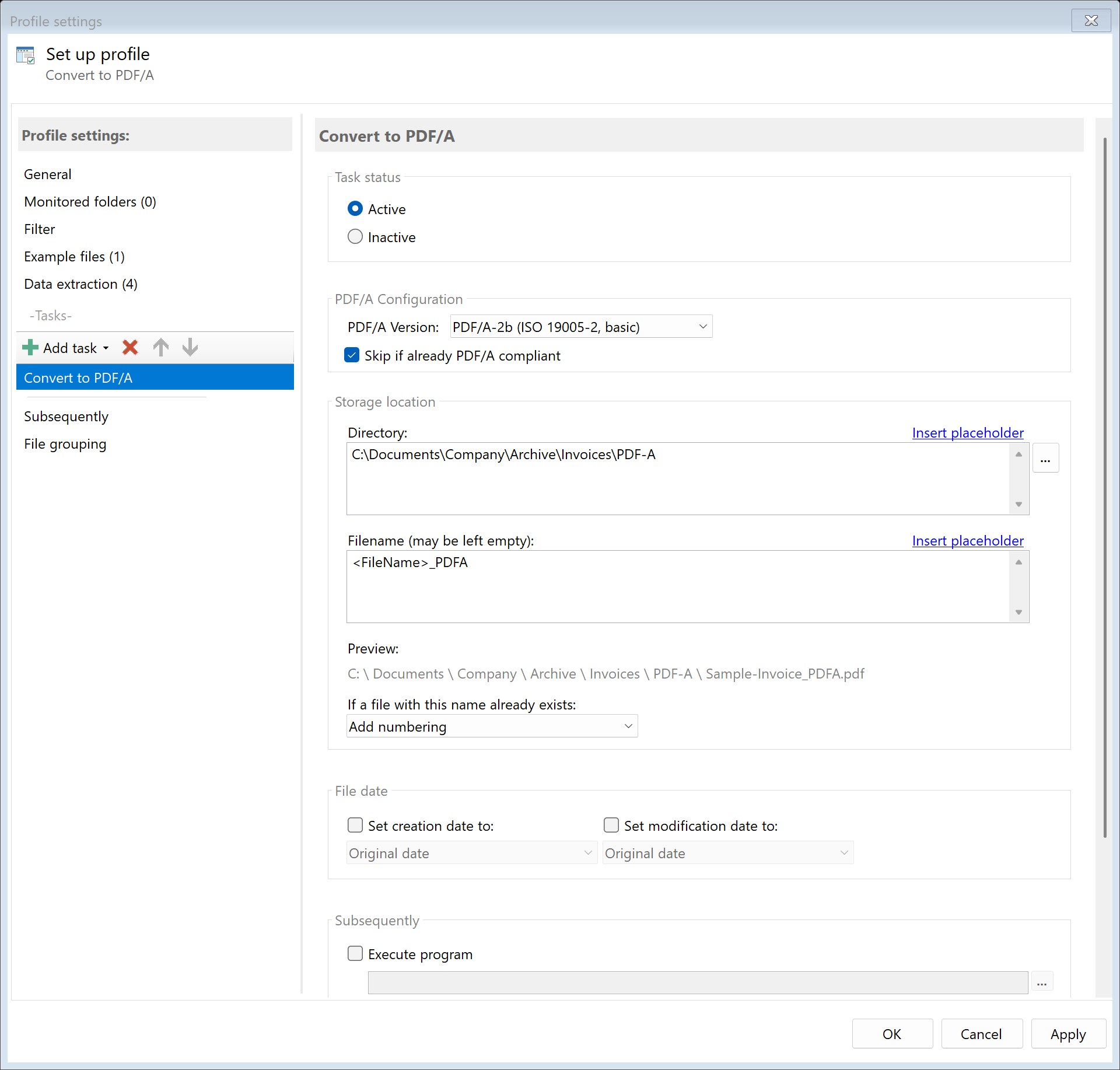 Task: Convert to PDF/A
27.1 Description
The Convert to PDF/A task converts a PDF to PDF/A format, which is designed for long-term archiving of documents. PDF/A ensures that the document can be displayed faithfully in the future.
Typical Use Cases
- Long-term Archiving: Make documents archivable for 10+ years
- Compliance: Meet legal archiving requirements
- DMS Import: Prepare documents for document management systems
- Government Communication: Meet requirements for electronic files
27.2 General Settings
Enabled
Enable this option so the task is executed for matching PDF files. Disabled tasks are skipped.
 PDF/A Configuration
Select the desired PDF/A version:
| Version |
ISO Standard |
Description |
Usage |
| PDF/A-1b |
ISO 19005-1 |
Basic conformance, visual representation guaranteed |
Maximum compatibility, older systems |
| PDF/A-2b |
ISO 19005-2 |
Extended, with JPEG2000 and transparencies |
Recommended standard for archiving |
| PDF/A-3b |
ISO 19005-3 |
With arbitrary attachments |
ZUGFeRD, Factur-X, e-invoices |
Note: The program supports the “b” variants (Basic), which ensure reliable visual reproduction. The “a” and “u” variants (with additional structure information or Unicode mapping) are not supported.
Recommendations
| Use Case |
Recommended Version |
| Standard archiving |
PDF/A-2b |
| ZUGFeRD/E-Invoice |
PDF/A-3b |
| Maximum compatibility |
PDF/A-1b |
27.4 Storage Location
Directory
Specify the target directory for the PDF/A file.
Note: It’s recommended to use a separate folder for each processing step to ensure clear separation.
Filename
Set the name for the PDF/A file.
Examples:
| Input |
Result |
| (empty) |
Document.pdf (original name) |
<FileName>_PDFA |
Document_PDFA.pdf |
Name Collisions
Choose what should happen if a file with the target name already exists.
27.5 File Date
Adjust Creation and Modification Date
Optionally, you can change the file date of the PDF/A file.
27.6 Afterwards
Call External Program
After conversion, an external program can be started automatically.
Parameters: Available placeholders: - <PathIncludingFilename> - Full path of the PDF/A file - <ParentDirectory> - Path of parent folder - <Filename> - Filename
27.7 Example: Invoice Archiving
Initial Situation
Incoming invoices should be stored in a long-term stable format for the legally required archiving period.
Configuration
- Enabled: Yes
- PDF/A Version: PDF/A-2b
- Directory:
D:\Archive\PDF-A\<TodaysYear4>\<TodaysMonth>
- Filename:
<FileName>
Result
| Original |
Converted |
C:\Incoming\Invoice_001.pdf |
D:\Archive\PDF-A\2024\12\Invoice_001.pdf (PDF/A-2b) |
27.8 Example: Preparation for DMS
Initial Situation
Your document management system requires PDF/A-1b for all incoming documents.
Configuration
- Enabled: Yes
- PDF/A Version: PDF/A-1b
- Directory:
\\Server\DMS\Import
- Filename:
<RuleId:1(DocumentNo)>_<TodaysYear4><TodaysMonth><TodaysDay>
27.4 Tips and Notes
What Happens During Conversion?
PDF/A conversion may include: - Embedding all used fonts - Removing JavaScript and multimedia - Converting transparencies - Standardizing color spaces - Adding XMP metadata
Non-Convertible Elements
The following elements may cause problems during conversion: - Non-embeddable fonts (will be substituted) - Encryption (will be removed) - JavaScript (will be removed) - Embedded multimedia content (will be removed)
File Size
PDF/A files may be larger than originals because all fonts must be embedded.
PDF/A-1 vs. PDF/A-2/3
| Aspect |
PDF/A-1 |
PDF/A-2/3 |
| Base |
PDF 1.4 |
PDF 1.7 |
| JPEG2000 |
No |
Yes |
| Transparencies |
No |
Yes |
| Attachments |
No |
Only PDF/A-3 |
| Compression |
Less efficient |
More efficient options |
Validation
Validate your PDF/A files with an appropriate tool: - Adobe Acrobat (Preflight) - veraPDF (Open Source) - Online validators
Already Converted PDFs
If a PDF is already in PDF/A format, it will be converted to the selected version or copied unchanged during conversion.