26 Create ZUGFeRD/Factur-X
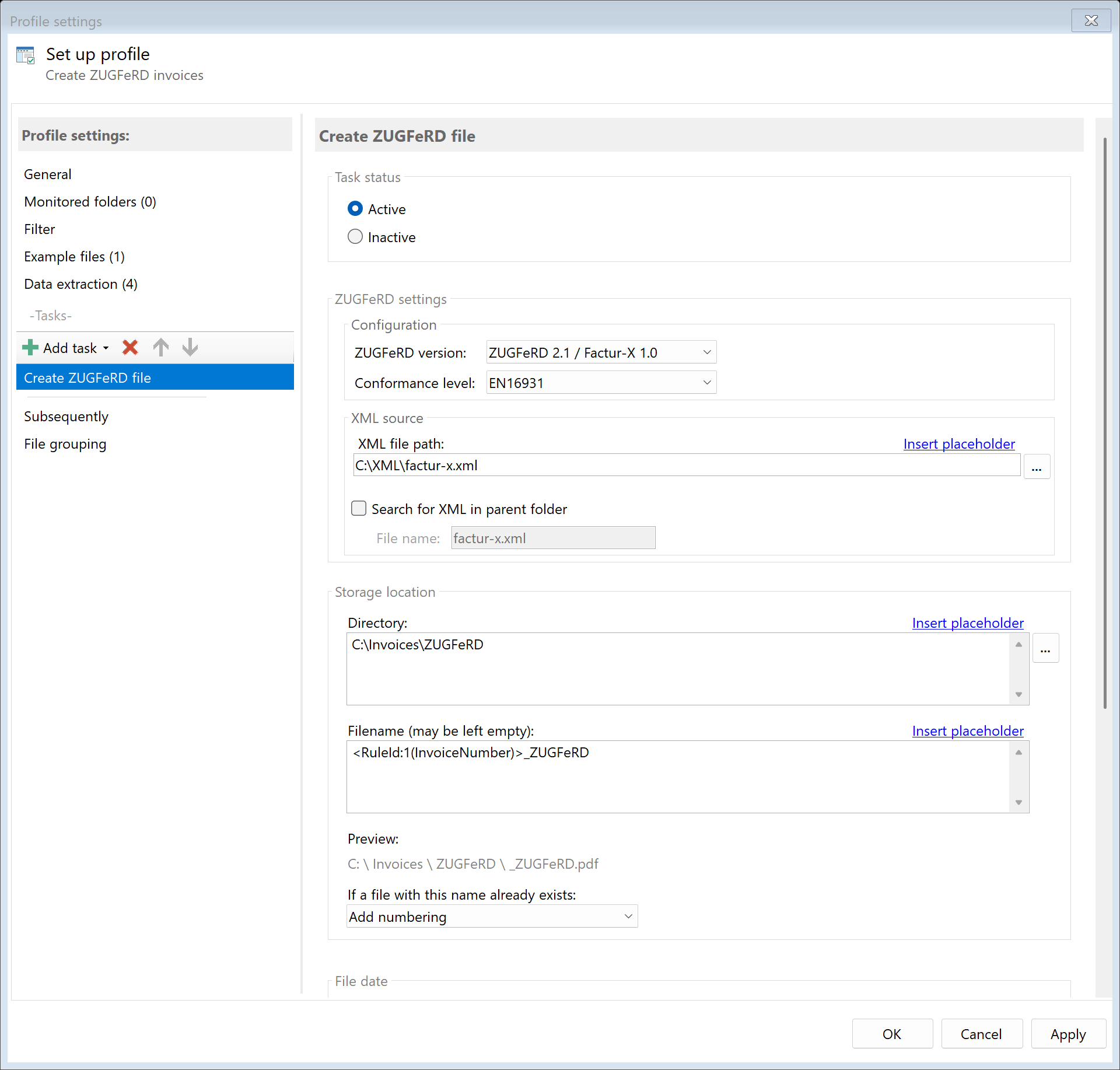 Task: Create ZUGFeRD
26.1 Description
The Create ZUGFeRD/Factur-X task converts a PDF into an electronic invoice according to the ZUGFeRD or Factur-X standard. A pre-existing structured XML file with invoice data is embedded in the PDF and the PDF is converted to PDF/A-3b format.
Typical Use Cases
- E-Invoice: Prepare PDF invoices for B2B or B2G requirements
- XRechnung: Create German government invoices according to EU standard
- Factur-X: Create French/European e-invoices
- Automation: Combine invoice PDFs with existing XML data
26.2 General Settings
Enabled
Enable this option so the task is executed for matching PDF files. Disabled tasks are skipped.
26.3 ZUGFeRD Version
 ZUGFeRD Configuration
Select the ZUGFeRD version:
| Version |
Description |
| ZUGFeRD 2.1 |
Widely used version |
| ZUGFeRD 2.3.2 |
Current version (recommended) |
Choose the conformance level based on your requirements:
| Level |
Description |
Usage |
| Minimum |
Minimum requirements |
Simple invoices |
| Basic |
Basic invoice data |
Standard invoices |
| Basic WL |
Basic without line item details |
Invoices without individual items |
| Comfort |
Extended invoice data |
Detailed invoices |
| Extended |
Complete invoice data |
Complex invoices |
| EN16931 |
EU standard for e-invoices |
EU-wide exchange |
| XRechnung |
German government standard |
Invoices to authorities |
26.5 XML File
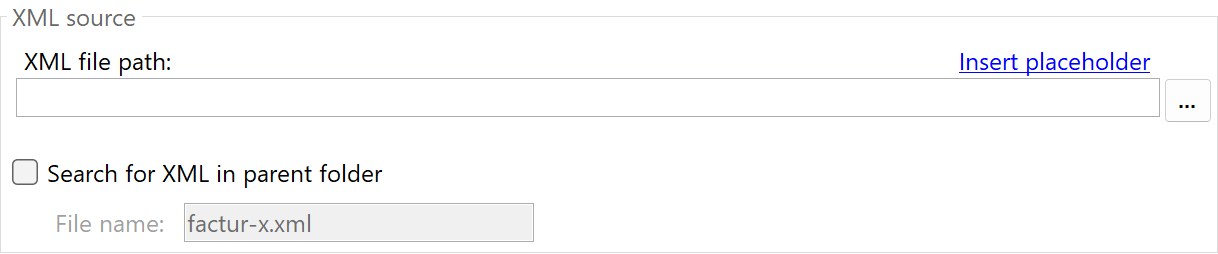 XML Source
Path to XML File
Specify the path to the XML file with invoice data. You can use placeholders.
Examples:
| Input |
Result |
D:\XML\<RuleId:1(InvoiceNo)>.xml |
D:\XML\2024001.xml |
<ParentDirectory>\<FileName>.xml |
C:\Invoices\Invoice_001.xml |
Search in Parent Folder
Enable this option to automatically search for the XML file in the same folder as the PDF.
Filename in Parent Folder
When “Search in Parent Folder” is enabled, specify the filename of the XML file. Default: factur-x.xml
26.6 Storage Location
Directory
Specify the target directory for the ZUGFeRD file.
Note: It’s recommended to use a separate folder for each processing step to ensure clear separation.
Filename
Set the name for the resulting ZUGFeRD PDF file.
Name Collisions
Choose what should happen if a file with the target name already exists.
26.7 File Date
Adjust Creation and Modification Date
Optionally, you can change the file date of the ZUGFeRD file.
26.8 Afterwards
Call External Program
After creating the ZUGFeRD file, an external program can be started automatically.
Parameters: Available placeholders: - <PathIncludingFilename> - Full path of the ZUGFeRD file - <ParentDirectory> - Path of parent folder - <Filename> - Filename
26.9 Example: Invoices for Government (XRechnung)
Initial Situation
You need to submit invoices to German authorities in XRechnung format. The XML files are created by your accounting software in the same folder as the PDFs.
Prerequisites
- PDF invoice present
- XML file with XRechnung-compliant data in the same folder
Configuration
- Enabled: Yes
- ZUGFeRD Version: ZUGFeRD 2.3.2
- Conformance Level: XRechnung
- Search in Parent Folder: Yes
- Filename in Parent Folder:
xrechnung.xml
- Directory:
D:\Outgoing\Authorities
- Filename:
<FileName>
Result
| Input Files |
Output |
Invoice_2024001.pdf + xrechnung.xml |
D:\Outgoing\Authorities\Invoice_2024001.pdf (ZUGFeRD/XRechnung) |
26.10 Example: Factur-X for French Customers
Initial Situation
You send invoices to French customers and must comply with the Factur-X format.
Configuration
- Enabled: Yes
- ZUGFeRD Version: ZUGFeRD 2.3.2
- Conformance Level: EN16931
- Path to XML File:
D:\Export\<RuleId:1(InvoiceNo)>_facturx.xml
- Directory:
D:\Sending\FR
- Filename:
Facture_<RuleId:1(InvoiceNo)>
26.5 Tips and Notes
PDF/A-3b Conversion
The PDF is automatically converted to PDF/A-3b if it’s not already in this format. This is a requirement for ZUGFeRD/Factur-X.
XML Structure
The XML file must conform to the selected ZUGFeRD/Factur-X schema. Invalid XML files will cause processing errors.
Validation
Validate your ZUGFeRD files after creation with an appropriate validator: - Free online validators - ZUGFeRD SDK - Government portals (for XRechnung)
- Minimum/Basic: For simple invoices without special requirements
- EN16931: For EU-wide B2B exchange
- XRechnung: Required for German government invoices
XML Sources
The XML file can come from various sources: - ERP system - Accounting software - Manually created - Other automation processes
Combination with “Save Attachments” Task
If you’re processing an existing ZUGFeRD invoice, you can use “Save Attachments” to extract the XML file.