27 Convert to PDF/A
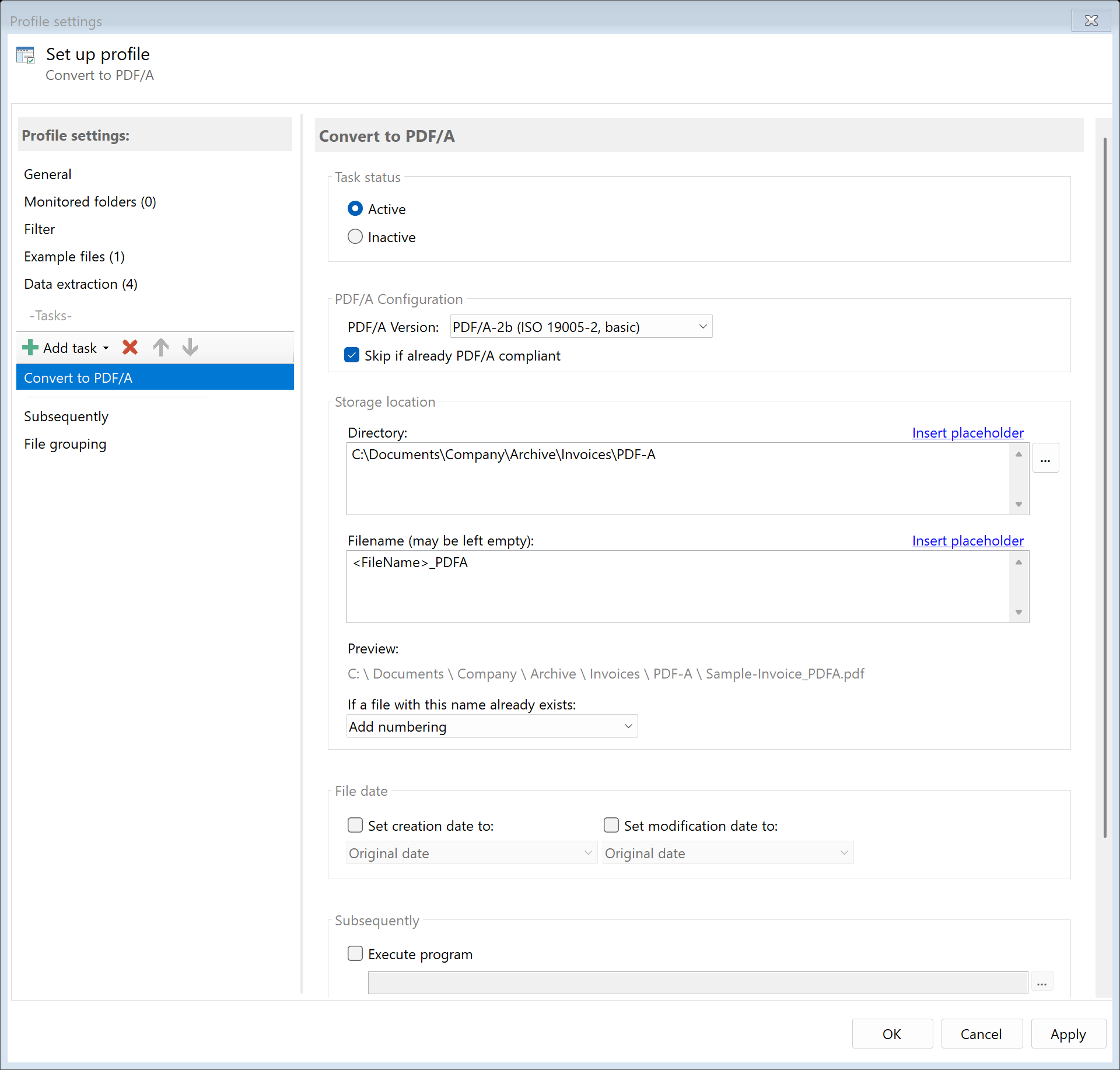 Task: Convert to PDF/A
27.1 Description
The Convert to PDF/A task converts a PDF to PDF/A format, which is designed for long-term archiving of documents. PDF/A ensures that the document can be displayed faithfully in the future.
Typical Use Cases
- Long-term Archiving: Make documents archivable for 10+ years
- Compliance: Meet legal archiving requirements
- DMS Import: Prepare documents for document management systems
- Government Communication: Meet requirements for electronic files
27.2 General Settings
Enabled
Enable this option so the task is executed for matching PDF files. Disabled tasks are skipped.
 PDF/A Configuration
Select the desired PDF/A version:
| Version |
ISO Standard |
Description |
Usage |
| PDF/A-1b |
ISO 19005-1 |
Basic conformance, visual representation guaranteed |
Maximum compatibility, older systems |
| PDF/A-2b |
ISO 19005-2 |
Extended, with JPEG2000 and transparencies |
Recommended standard for archiving |
| PDF/A-3b |
ISO 19005-3 |
With arbitrary attachments |
ZUGFeRD, Factur-X, e-invoices |
Note: The program supports the "b" variants (Basic), which ensure reliable visual reproduction. The "a" and "u" variants (with additional structure information or Unicode mapping) are not supported.
Recommendations
| Use Case |
Recommended Version |
| Standard archiving |
PDF/A-2b |
| ZUGFeRD/E-Invoice |
PDF/A-3b |
| Maximum compatibility |
PDF/A-1b |
27.4 Storage Location
Directory
Specify the target directory for the PDF/A file.
Note: It's recommended to use a separate folder for each processing step to ensure clear separation.
Filename
Set the name for the PDF/A file.
Examples:
| Input |
Result |
| (empty) |
Document.pdf (original name) |
<FileName>_PDFA |
Document_PDFA.pdf |
Name Collisions
Choose what should happen if a file with the target name already exists.
27.5 File Date
Adjust Creation and Modification Date
Optionally, you can change the file date of the PDF/A file.
27.6 Afterwards
Call External Program
After conversion, an external program can be started automatically.
Parameters: Available placeholders:
<PathIncludingFilename> - Full path of the PDF/A file<ParentDirectory> - Path of parent folder<Filename> - Filename
27.7 Example: Invoice Archiving
Initial Situation
Incoming invoices should be stored in a long-term stable format for the legally required archiving period.
Configuration
- Enabled: Yes
- PDF/A Version: PDF/A-2b
- Directory:
D:\Archive\PDF-A\<TodaysYear4>\<TodaysMonth>
- Filename:
<FileName>
Result
| Original |
Converted |
C:\Incoming\Invoice_001.pdf |
D:\Archive\PDF-A\2024\12\Invoice_001.pdf (PDF/A-2b) |
27.8 Example: Preparation for DMS
Initial Situation
Your document management system requires PDF/A-1b for all incoming documents.
Configuration
- Enabled: Yes
- PDF/A Version: PDF/A-1b
- Directory:
\\Server\DMS\Import
- Filename:
<RuleId:1(DocumentNo)>_<TodaysYear4><TodaysMonth><TodaysDay>
27.9 Tips and Notes
What Happens During Conversion?
PDF/A conversion may include:
- Embedding all used fonts
- Removing JavaScript and multimedia
- Converting transparencies
- Standardizing color spaces
- Adding XMP metadata
Non-Convertible Elements
The following elements may cause problems during conversion:
- Non-embeddable fonts (will be substituted)
- Encryption (will be removed)
- JavaScript (will be removed)
- Embedded multimedia content (will be removed)
File Size
PDF/A files may be larger than originals because all fonts must be embedded.
Files that use CMYK colors (such as invoices from the prepress systems of large senders) become considerably larger: PDF/A requires a color profile for them, which alone is about 2.6 MB in size. PDF/A-2b or PDF/A-3b is recommended for such files - in PDF/A-1b this color profile is not permitted.
PDF/A-1 vs. PDF/A-2/3
| Aspect |
PDF/A-1 |
PDF/A-2/3 |
| Base |
PDF 1.4 |
PDF 1.7 |
| JPEG2000 |
No |
Yes |
| Transparencies |
No |
Yes |
| Attachments |
No |
Only PDF/A-3 |
| Compression |
Less efficient |
More efficient options |
Validation
Validate your PDF/A files with an appropriate tool:
- Adobe Acrobat (Preflight)
- veraPDF (Open Source)
- Online validators
Already Converted PDFs
If a PDF is already in PDF/A format, it will be converted to the selected version or copied unchanged during conversion.
Files with Embedded Files (E-Invoices)
PDF/A-1 and PDF/A-2 do not allow arbitrary embedded files. If a file contains attachments - such as the invoice file of an e-invoice (ZUGFeRD or Factur-X) - the program therefore always converts it to PDF/A-3b, even if a different version is selected. The task result says so. This way an e-invoice remains a valid e-invoice.
If the Conversion Does Not Succeed
If the conversion reports an error, the task fails and states the reason - no file is created that is PDF/A in name only. Particularities that may affect the appearance (such as transparency removed in PDF/A-1) are shown as a note in the task result.
After the conversion, the program also compares the appearance of each page with the source file. If visible content is missing in the converted file - such as the text of a font that is not embedded in the source file - the task fails and names the page. No file with missing content is stored. The same applies to the task Create ZUGFeRD/Factur-X, which converts the file to PDF/A-3.
PDF/A Files in Other Tasks
The tasks Stamp and Watermark, Insert Barcode, Replace Content and Text Recognition (OCR) insert text into the pages or rewrite the file. If the source file was a PDF/A file, the program restores its PDF/A version afterwards on its own (as the "b" variant) - an e-invoice remains a valid e-invoice even after a stamp. A separate "Convert to PDF/A" task is not needed for this. If the version cannot be restored in an exceptional case, this is shown as a note in the task result.
Merge PDFs also keeps the property: if all merged files are PDF/A files, so is the result (in the lowest common version). Embed Attachments converts a PDF/A-1 or PDF/A-2 file to PDF/A-3b beforehand, because only this version allows arbitrary attachments.
Change File Protection is the exception: PDF/A does not allow encryption. A password-protected file is no longer a PDF/A file - the task result points this out.