40.7 Windows Service
40.7.1 Overview 
The Windows service page brings together everything about background operation: the operating mode (does the main program process by itself, or an external processor?), the live status of the processing service, and the management actions. This makes it visible at a glance whether anyone is actually processing right now - the most common operating mistake was a ticked checkbox without a running service.
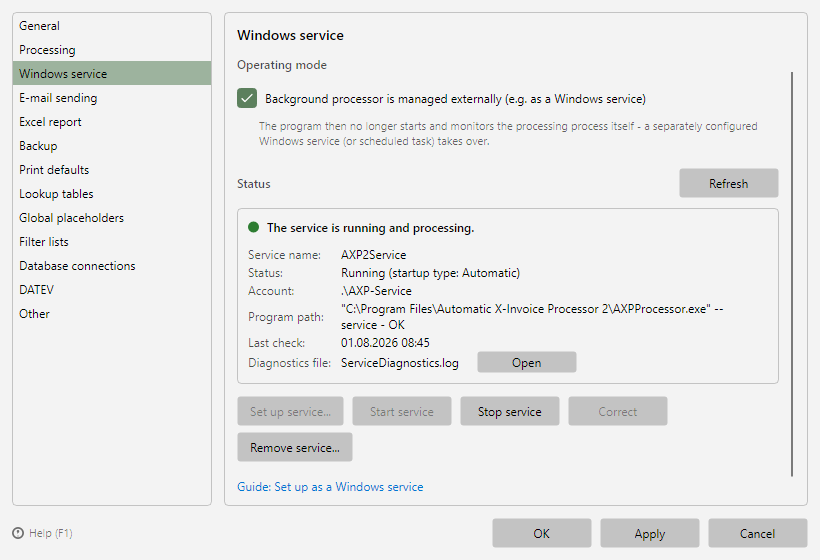 Program options, Windows service page
The guide Set up as a Windows service describes the step-by-step setup including the service account; the technical background is in chapter 60.1.
40.7.2 Operating mode 
Background processor is managed externally (e.g. as a Windows service): the main program then no longer starts and monitors the processing process itself. Processing must be handled by a separately configured Windows service (or scheduled task) - this way it also runs without a logged-in user, e.g. on a server.
If the option is not set, the main program starts and monitors the background processor itself as usual; processing then only runs while the program is running.
Check on saving and at program start: If the option is set, the program checks whether the service is running when the options are saved and after every program start (after a 90-second startup period, at the earliest five minutes after booting). If the service is stopped or set up incorrectly, the program offers to start or correct it. If no service has been set up at all, it offers to set one up when saving; after program start, it shows a persistent notice in the main window instead. You also get only such a notice if the window is hidden in the notification area.
Protection against double processing: Only one processor at a time processes for each Windows user account, and as long as a processing service is running on the computer, no program window processes as well - not even if the option is not set. A program window without the option shows this in the status bar: "Processing by the Windows service" or, if the same user is processing in another session, "Processing in another session of this user". When the other processing ends, for example because the service is stopped, the window takes over again by itself within a few seconds (details in chapter 60.1.4).
40.7.3 Status 
The status light combines operating mode, service, and sign of life into one overall state:
| Display |
Meaning |
| Grey - processing runs in the program window |
External processor is disabled, the main program processes by itself |
| Red - no processing service is set up |
Option enabled, but neither a service nor a sign of life: nobody is processing |
| Red - the service is set up incorrectly |
The service points to the wrong program file and cannot start (see Correct) |
| Orange - service not active |
The service is set up but is currently not running |
| Orange - service runs without a sign of life |
The service is running but reports no processing - usually it runs under a different user account |
| Orange - service running, option disabled |
The service processes, the program window holds back (see 40.7.2). Enable the option - or remove the service if the program window is to process by itself again |
| Green - external processing active |
No Windows service, but an external processor reports in (e.g. via Task Scheduler) |
| Green - the service is running and processing |
Normal state in service operation |
Below that you find the key data of the service that was found: service name, status including startup type, account, program path (with an assessment), and the time of the last check. If Windows starts the service with a delay after booting, the startup type reads "Automatic (delayed)" (see 40.7.4). Open shows the diagnostics file ServiceDiagnostics.log, in which the service, the processor, and the monitoring log their start and stop decisions. The status refreshes automatically while the page is visible; Refresh forces an immediate check.
In addition, a note line appears where relevant:
- Service account "Local System": Not recommended - sign-in data, passwords, network drives, and printers in Windows apply per user account.
- Different service account: Explains a missing sign of life. The status data is stored per user account; if the service runs under a different account, this window cannot see its processing.
- Missing automatic startup: After a Windows restart the service would not start. The Start service action sets the automatic startup (delayed) as well.
40.7.4 Actions 
Each action requires exactly one confirmation as an administrator (Windows User Account Control).
| Action |
Effect |
| Set up service... |
Asks for the service name, Windows user account, and password and creates the service: program path pointing to AXPProcessor.exe, automatic startup (delayed, see below), recovery after a crash (three restart attempts one minute apart), and the "Log on as a service" right for the service account. The service is then started. |
| Start service |
Starts the existing service and configures the recovery after a crash. If the service does not yet start automatically (startup type "Manual" or "Disabled"), the action sets automatic startup (delayed); an existing automatic startup type stays unchanged |
| Stop service |
Stops the service; the startup type stays unchanged |
| Correct |
Switches the program path of an incorrectly configured service to AXPProcessor.exe, sets automatic startup (delayed) including recovery, and starts it. Service account and password stay unchanged |
| Remove service... |
Stops the service and removes it. If the operating mode is still set to "external" afterwards, the program offers to disable it as well - otherwise nobody processes |
Delayed start: When Set up service..., Start service, or Correct sets the automatic startup, the service receives the Windows startup type "Automatic (Delayed Start)". Windows then starts it only shortly after booting, once the network and logon services are available. This way, the service account logon after a restart does not fail because, for example, the domain controller is not yet reachable (error 1069). The recovery after a crash does not help in this case, because without a logon the service never starts in the first place. During the first minutes after booting, the status bar therefore shows "External processor - the service will start within ... seconds" instead of "Processing not active" while the option is set. During an update, setup switches services that already start automatically to the delayed start once; a different choice made deliberately afterwards is kept on future updates.
Re-enter password: If the service start fails because the Windows logon of the service account fails (error 1069) - usually after a password change, when the account is temporarily locked, or without the "Log on as a service" right -, Start service and Correct offer to re-enter the password. The program checks the password, updates the logon data of the service, grants the account the "Log on as a service" right again, and starts the service; the program path and the startup type remain unchanged. There is no need to remove the service or restart the computer. The same offer appears when the program starts a stopped service after the options are closed.
Application data on a network share: If the application data of the user account is located on a share (e.g. through folder redirection of %AppData%), Set up service... warns about it and asks for confirmation before setting up: the service often cannot open the processing database there reliably, and processing would then stand still. For service operation, the application data of the service account should be stored locally.
Note on the password: It is not passed via the command line (where it would be visible to other programs), but through a short-lived, encrypted file in the signed-in user's temp folder that the setup process deletes immediately afterwards - both during setup and when the password is re-entered. This also works if you are not an administrator yourself and an administrator confirms the Windows prompt with their own account. The password is only stored where Windows keeps it for the service anyway.
40.7.5 Uninstallation 
When the program is uninstalled, registered processing services are stopped and removed automatically - including ones created by hand and incorrectly configured ones. During an update, by contrast, the service remains in place: setup stops it briefly so that the program files can be replaced, and starts it again after the installation.